How many hours does your team spend each week replying to the same enquiries, confirming bookings, sending receipts, or chasing order updates? Those hours slow growth and frustrate customers who expect instant answers. Website automation lets your website handle these routine tasks on its own, so your team can focus on sales, service, and strategy.
Key Takeaways
-
-
- Website automation lets your website capture, process, and respond to customer actions without manual effort.
- Business process automation works on a trigger-and-action pattern: a visitor action starts a workflow, and the workflow completes the follow-up steps.
- The right website automation tools depend on the processes you want to automate and the systems you already use.
- No-code website automation is enough for forms, notifications, and basic bookings.
- Some processes, such as lead routing or multi-channel stock sync, need a CRM or inventory system.
- Start with enquiries, bookings, or payments, then expand.
What Is Website Automation?
Website automation is the use of forms, integrations, and software rules to let a website complete routine business tasks without manual work. When a visitor submits an enquiry, books a slot, or places an order, the website saves the details and sends the right response automatically. It does not replace your team. It removes repetitive work so people can handle the tasks that need judgment, such as approving quotations or resolving complex issues. A well-built business website is the foundation for all of this.
How Does Business Process Automation Work on a Website?
Business process automation follows a simple trigger-and-action pattern. A trigger, such as a form submission, payment, or registration, starts a workflow. The workflow then performs actions like saving data, sending a confirmation email, updating a status, or notifying your team. Rules decide what happens next, and records show what was completed. Your website becomes an active system that serves customers around the clock, not just a brochure.
Which Website Automation Tools Do Businesses Use?
Website automation tools fall into practical groups, depending on the process. The table below shows what each group does and which tools are commonly used.
Choose tools that fit your business processes and integrate with each other. If you are building an online store, our guide to ecommerce website development explains how these tools fit into the wider build.
What Is No-Code Website Automation?
No-code website automation lets non-developers build workflows using visual builders and ready-made templates. Enquiry forms, email confirmations, booking pages, and simple chatbots can be set up without writing code. It is quick and affordable, but advanced routing, large order volumes, and multi-system integrations may need developer support. A practical path is to start no-code and add custom integrations as your needs grow.
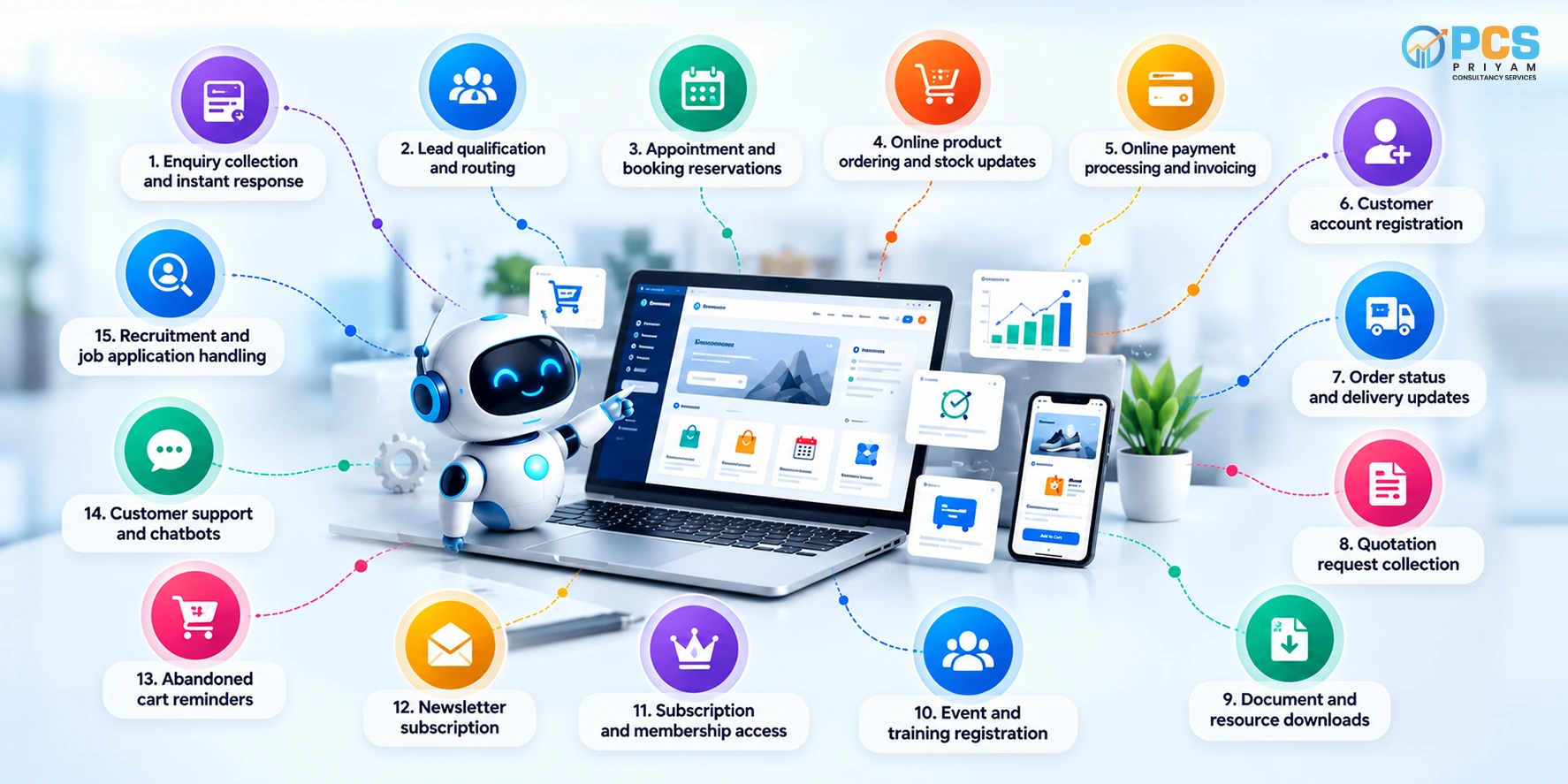
15 Business Processes You Can Automate With Website Automation
Here are 15 business processes that a website can handle automatically, from the first customer enquiry to post-sale updates.
- Enquiry collection and instant response:Capture enquiries, save submitted details, and send automatic acknowledgement emails.
- Lead qualification and routing:Ask qualifying questions, categorise enquiries by service or location, and forward them to the right team. Advanced routing may need a CRM integration.
- Appointment and booking reservations:Show available slots, accept bookings, prevent double bookings, and send confirmations and reminders.
- Online product ordering and stock updates:Let customers select products, add them to a cart, place orders, and receive confirmations, while stock quantities update after each order. Syncing across multiple sales channels may need an inventory system.
- Online payment processing and invoicing: Accept payments through an integrated gateway, verify the transaction status through the gateway’s secure server-side notifications , and generate invoices or receipts from confirmed transactions using your billing rules. Razorpay also publishes webhook guidance for the same purpose.
- Customer account registration: Register users, verify email addresses, and automate account activation and password resets.
- Order status and delivery updates: Show order status and send shipping or delivery notifications using order and courier data.
Quotation request collection: Collect requirements, specifications, quantities, and contact details through a structured form. Your team prepares and approves the actual quotation.
Document and resource downloads: Deliver brochures, catalogues, and guides automatically after a visitor completes an eligible form.
Event and training registration: Register participants, collect details, process fees where applicable, and send confirmation emails.
Subscription and membership access: Accept registrations, manage access to protected content, and send renewal or expiry notifications. Recurring payments need a compatible payment service.
Newsletter subscription: Collect subscriptions, send confirmation emails, and pass opted-in contacts to your email platform.
Abandoned cart reminders: For e-commerce sites, detect incomplete carts and send follow-up messages through permitted channels, subject to applicable privacy, consent, and marketing rules.
Customer support and chatbots: Use website chatbots to answer common questions, share service information, and direct complex enquiries to the support team.
Recruitment and job application handling: Automate job application submissions, resume collection, and candidate acknowledgement emails through a careers page. Shortlisting and interview scheduling are then handled by your HR team.
Automated enquiries and reminders also feed your marketing. Pairing them with performance marketing helps you track which campaigns produce the leads your automation captures.
How Does Workflow Automation Improve Website Efficiency?
Workflow automation links separate steps into one continuous flow. Consider an online order: the customer pays, the payment status updates, an invoice is generated, stock is reduced, and a confirmation email is sent, all without anyone copying data between systems. The result is faster responses, fewer errors, and consistent service even during busy periods.
What Are the Benefits of Website Automation?
- Time savings: Staff spend less time on repetitive tasks.
- Faster response: Customers get confirmations and answers instantly.
- Fewer errors: Rules replace manual data entry.
- 24/7 availability:Bookings, orders, and enquiries are handled at any hour.
- Scalability: Higher volumes do not require proportionally more staff.
How Do You Choose Business Process Automation Software?
The right business process automation software should fit your processes, not force you to change them. Check these points:
- Integrations: Does it connect with your payment gateway, email platform, and any CRM or inventory system?
- Ease of use: Can your team manage workflows without constant developer help?
- Scalability: Will it handle more orders, bookings, and users later?
- Data protection and security:Does it protect customer information and support compliance with applicable laws, such as India’s DPDP Act and Rules and the EU’s GDPR where relevant? Follow OWASP security guidance for sensitive workflows such as payments.
- Support and pricing:Are costs predictable, and is help available?
Begin with one high-impact process, such as enquiries or bookings, then expand. Keep human review on sensitive steps like quotations and candidate shortlisting.
How Do Website Automation Services in Coimbatore Help Businesses?
Website automation services from a local partner remove the trial and error. A good provider reviews your current processes, recommends suitable tools, builds and tests the workflows, and supports you afterward. A Coimbatore-based team also offers easier meetings and faster support in your time zone and language. Priyam Consultancy Services, a website development company in Coimbatore, helps businesses automate enquiries, bookings, orders, payments, and customer support through their websites, so daily operations run smoothly with less manual effort.
Conclusion
Website automation is one of the most practical ways to reduce manual work and serve customers faster. Start with the processes that consume the most time, such as enquiries, bookings, and order updates, then build out with the right tools and a clear plan. Ready to see what you can automate? Book a free consultation with Priyam Consultancy Services, and we will review your website and suggest where to begin.
Frequently Asked Questions